
Help Article
Competitions
Follow a competition from its home page, with your entry, the programme, the latest results, notices, and where to find standings, queries and flights.
Competitions
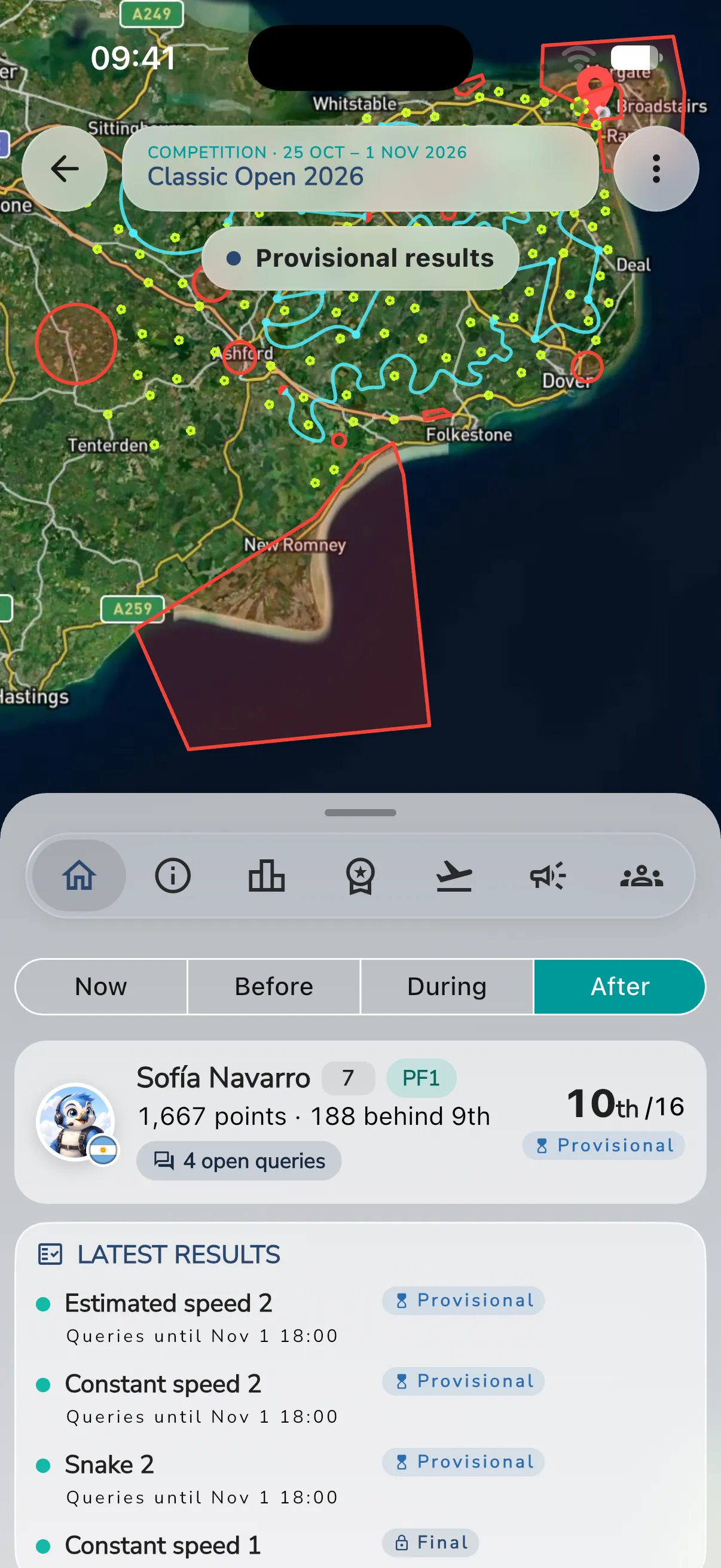
A competition is an event with a championship, a field of pilots and a programme of tasks. Its home page is built around a live map. Open it from Community, in My Groups or Meetups, and tap the competition.
The home page changes with the phase of the event: before it starts, while it runs, and after it ends. Competition features can depend on the version of the app, so keep Gaggle up to date.
Sections
The bottom row of the competition page has these sections:
- Home: the cards described below.
- About: information about the event.
- Leaderboards: the championship and the tasks. See Championship Standings and Results.
- Hall of Fame: records from the event.
- Flights: the flights recorded for the event.
- Notices: the organisers’ notices, for members.
- Pilots: the field. Before the competition has pilots, this section is called Participants.
Buttons at the top right open chat, Invite Others, Queries, the competition manager for staff, and Settings. On a phone, tap More actions to see them.
Your entry
If you compete, the first card on Home is your entry. It shows your name, number and class. Once results are published, it also shows:
- Your place in your class, for example “10th /16”, and your points.
- The gap to the pilot above you, or the lead over the pilot below you.
- The status of the results, for example Provisional.
- The flying window that is open now, with when it closes, or the next one, with when it opens.
- Your open queries, for example 4 open queries. Tap it to open your queries. See Championship Queries and Protests.
Tap the card to open the results. Before the competition starts, it opens the list of pilots.
Pilots who are not ranked yet see Not ranked yet.
Cards on Home
- Latest results: the tasks whose results came out last, with how far each is published (Provisional, Official or Final) and, while queries are open, when they close, for example Queries until. Tap it to open the results. It appears once the competition has started and a result is out.
- Programme: the stages with their days and tasks. Today’s tasks are bold. Each task shows how far its results are published. If the organisers have not set out the tasks, the card says so.
- Pilots: how many pilots there are, with their classes and nations. Before the competition has pilots, this card is called Participants. Tap it to open the pilots.
- Notices: the pinned notices and today’s, a line each with its kind and time. Tap it to open Notices. It shows until the event is over, and only when there are such notices.
- By the numbers: after the event, the tasks flown and cancelled, and the pilots and nations.
- A line on the map shows who is flying now, or Nobody is in the air.
Notices
The Notices section is the organisers’ board for the event. It is for members.
- Pinned notices are at the top, under Pinned.
- The other notices are grouped by day, newest first. Each shows its time in the event’s time zone.
- Tap Show older notices to load earlier days. Tap Hide earlier to fold a group of earlier notices again.
- A notice that is about a task shows the task as a chip. Tap the chip to open that task’s results.
- If Gaggle translated a notice into your language, it says Translated. Tap Show original to read what the organiser wrote, and Show translation to go back.
- Tap the link icon to copy a link to a notice. Gaggle confirms with Link to the notice copied.
Organisers can pin and unpin notices.
Standings and flights
Tap Leaderboards, then the Championship row, for the standings, penalties and queries. See Championship Standings and Results and Championship Penalties.
Before you fly, see Timing Declarations, Course Photos and Choose or Scan a Task Before Takeoff. In the air, see Competition Flight Screen.